




Skip to content
HYPERDYNE
Porn terminator software for Windows

Need a porn terminator? Meet Snitch 5.

Snitch 5 finds adult and inappropriate pictures and videos on your Windows PC with a new AI detection engine. You see what it found, then you decide what goes. Everything stays on your PC.

  • One-time price, no subscription
  • Windows 10 and 11
  • Trusted since 2002
A new generation

What a good porn terminator should do.

Find adult material wherever it is on the PC. Show it to you calmly. Remove only what you choose.

Snitch 5 is the newest generation of the porn removal software Hyperdyne has made since 2002. Its AI engine looks at what each picture shows, so a file with an innocent name is still found.

How Snitch 5 does it

  • Looks at the picture itself. The AI engine checks every picture, and frames from every video, whatever the file is called.
  • Checks browsing too. Chrome and Edge history for every Windows user on the PC. Snitch Plus reads eight browsers.
  • Covers every drive. Local, USB and external drives.
  • Shows you first. Thumbnails with the most suspicious first, and a blur switch. Nothing is deleted unless you choose it.
  • Removes it for good, with Plus. Snitch Plus overwrites files before it deletes them, so undelete tools cannot bring them back. Terminated.
How it works

Three steps, and you stay in charge.

  1. Scan

    Choose a drive or folder, including USB and external drives. The AI engine checks every picture and frames from every video, and Snitch reads the browser history.

  2. Review

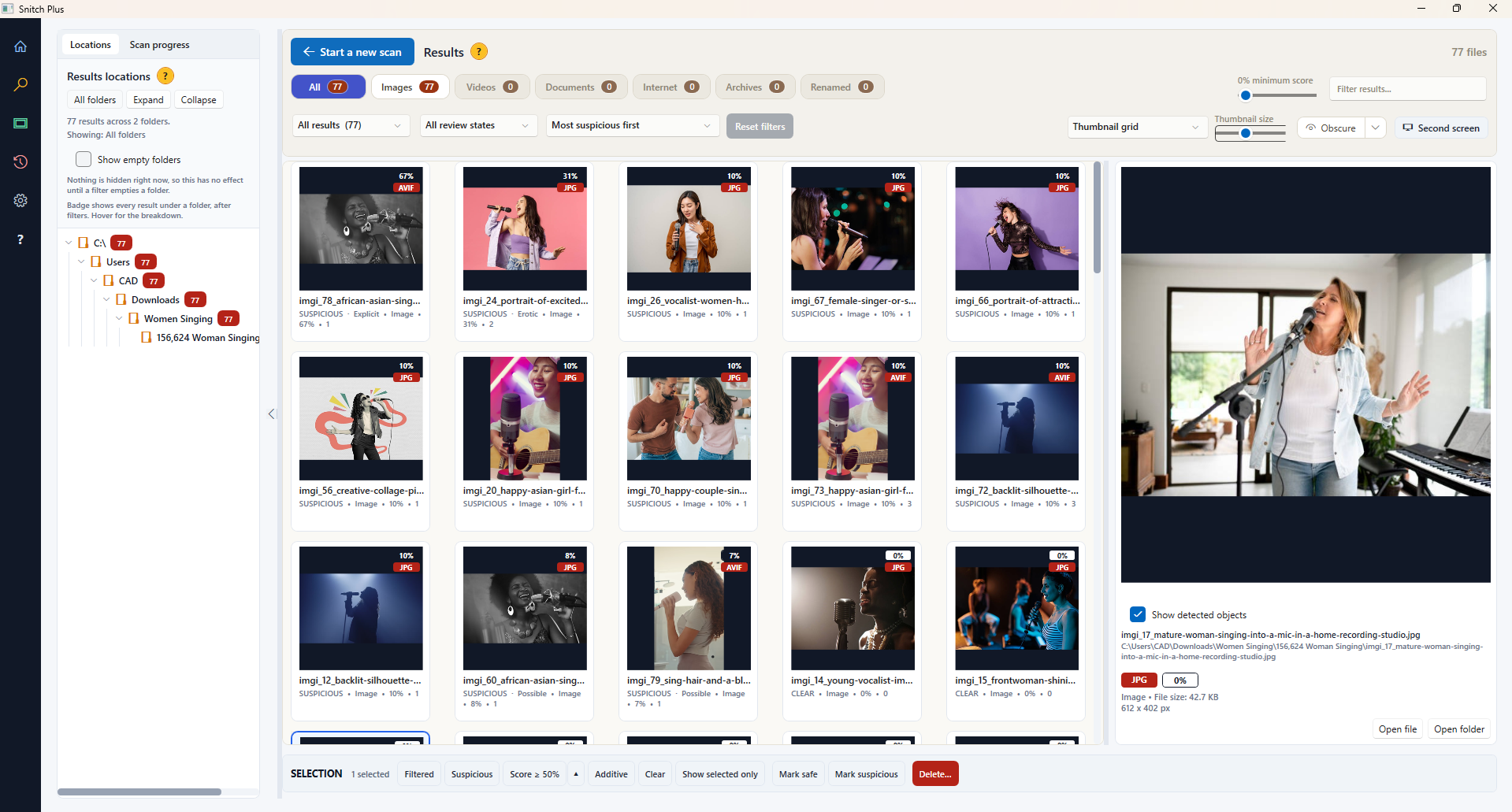
    Results arrive sorted, the most suspicious first, as thumbnails with a score. Blur a picture if you would rather not see it.

  3. Clean up

    Mark what you recognise as safe. Select what should go and confirm. Nothing is deleted unless you choose it.

The Snitch 5 review screen: scan results as thumbnails, each with a suspicion score, waiting for you to decide.
What Snitch checks

Pictures, videos and browsing, on the whole PC.

  • Image & video analysis

    Uses AI to recognise adult content in images and video frames. Object detection and scene recognition help identify material that needs a closer look.

  • Internet history checks

    Checks Chrome and Microsoft Edge history for visits to adult websites, including browsing history from other Windows users on the same PC.

  • Filename keyword checks

    Looks for suspicious words in file names using built-in keyword lists. Helps bring potentially unwanted files to your attention.

  • Choose where to scan

    Scan local and USB drives, or select particular folders. Exclude locations you want to skip and narrow your scan by file date, size or image dimensions.

  • Hardware-accelerated analysis

    Uses your graphics card to speed up AI analysis where supported. Your processor can handle the analysis too, so a dedicated graphics card is optional.

  • Clear results & previews

    Browse thumbnails or a detailed file list, with suspicion scores to help prioritise your review. Preview individual files and blur sensitive images when needed.

For the home PC

Built for the computer at home.

A shared family computer. A laptop passed down to a teenager. A PC you are about to sell or give away. Snitch shows you what is on it, so you can deal with it calmly and in private.

  • Scans local, USB and external drives
  • Checks the browser history of every Windows user on the PC
  • Family Packs cover four PCs
  • Not parental control: it shows what is already there
Choose your edition

Buy once. Your license does not expire.

The original and best

Snitch 5

$39.95 one PC

Family Pack, four PCs: $59

  • AI detection of adult images and videos
  • Browser history analysis — Chrome and Edge
  • Review thumbnails before anything is deleted
  • GPU-accelerated — full drives in minutes
  • Windows 10 and 11 · everything stays on your PC
Buy Snitch 5
Our most powerful technology for home users

Snitch Plus 5

$59.95 one PC

Family Pack, four PCs: $89

  • Secure shredding — deleted files can't be recovered
  • Documents and archives, scanned inside
  • Finds renamed and disguised files by header
  • Eight browsers — Firefox, Brave, Opera and more, as well as Chrome and Edge
  • Custom keyword lists for the terms that matter to you
  • Interrupted scans resume where they stopped
Buy Snitch Plus 5

Compare every feature

Try before you buy

See the technology on your own PC first.

Try the new AI based detection technology on your own PC for 14 days, test it on your actual hardware and your own data. See how fast GPU accelerated scanning can be. Some functions like deletion and copying are disabled, displays a limited selection of suspicious results.

Questions

What people ask before they buy.

Does anything leave my computer?

No. Every scan and every piece of analysis runs on the machine itself. Snitch does not upload files, does not send results anywhere, and does not need an account or an internet connection to scan.

Will it flag innocent photos?

Some, yes — any detector does. That is exactly why nothing is deleted automatically. Results are sorted with the most serious at the top, each one shows why it was flagged, and you mark what is safe. A beach photo will typically land in the lowest band rather than at the top of your list.

What can I try in the technology demo?

Try the new AI based detection technology on your own PC for 14 days, test it on your actual hardware and your own data. See how fast GPU accelerated scanning can be. Some functions like deletion and copying are disabled, displays a limited selection of suspicious results. Get the technology demo here, no account required, no email, no cost.

What is the difference between Snitch and Snitch Plus?

Snitch covers images, video and browser history on local and attached drives, and deletes only what you specify. Snitch Plus adds support for a bunch of extra image and video file formats, documents, archives, renamed-file detection, custom keyword lists, scan recovery, and secure file shredding that overwrites a file so it cannot be recovered. See the full comparison.

How does licensing work?

Snitch and Snitch Plus are a one-time purchase with a lifetime license. Version 5 activates online once on the computer you install it on, then works offline for good; reinstalling on the same computer is always free. Additional activations are for moving to a new PC or upgrading: the license allows a sensible number over time, with more added every six months. Earlier versions use a key code. PinPoint Auditor is licensed annually. If you lose a license, your account page has it, or we can re-issue it against your purchase email.

Is this parental control software?

No. Parental controls try to block content before it arrives. Snitch looks at what is already on the machine and shows you what is there. They solve different problems, and plenty of people use both.

Can I use Snitch on a work computer?

No. Snitch, Snitch Plus and the technology demos are home products: they will not run on a computer that is joined to a Windows domain or to Microsoft Entra ID, or that runs Windows Server. A home PC where you sign in to Office with a work email is fine. For workplaces and schools, PinPoint Auditor is the product built for that. About PinPoint Auditor.

Find out what is on your PC today.

One-time price from $39.95, or start with the free technology demo.

Checking computers at work? Snitch is for home PCs. See PinPoint Auditor